Showing posts with label computers. Show all posts

Saturday, May 16, 2009

Back in the day, if we wanted to transfer data between our computers (avoiding the slow Internet) we would just go over ethernet. Nowadays, we go over the wifi.

At one point in time, we had a very crappy laptop lacking a network or wifi card. Oh, and the CD drive was broken. I put some stuff on it using 3.25" disks and later using a flash memory stick (though the laptop was running 98, so I first had to copy over drivers on 3.25" disks). It was a collosal pain.

Yet earlier today, I observed some of my housemates, both on the same wifi network, transferring music between their laptops using first a flash memory stick and--when that proved inconveniently small--an external hard drive.

The moral of the story: Some people don't know how to setup webservers, sshd, or the like, and their lives are, consequently, miserable. Barely worth living, one could argue.

Dearest Senecans,
http://192.168.1.171/music/

(I've been meaning to configure a dyndns thing for my laptop, but have yet to do so, and how often do people here need to access my webserver, anyway?)

Saturday, April 18, 2009

Why must windows be quadrilaterals? When I have mplayer in the upper right corner of the screen, I want Firefox to take up the other three quadrants. Sure, it will mess up a lot of layouts designed for quadrilaterals, but if I want it to flow that way, whose to tell me no? X? Gnome? Firefox?

Wizzeak.

Sunday, November 25, 2007

Over by the office furniture in Office Depot, they have nice big pictures on the wall, seemingly advertising the chairs and desks. Nice, shiny expensive chairs and fancy wooden desk.

...on top of which rest 20-year-old computers. An old Apple, complete with the ugly mouse, an old IBM-Compat. with a green monochrome CRT displaying a text terminal...

Maybe they're just really old pictures for decoration,not modelling any current merchandise.

Wednesday, October 17, 2007

I was just switching around the mice on ZombieComp when I noticed the very-little-used GE PS/2 mouse has a warning label on the bottom informing us that it contains lead, so wash your hands after using it.

It doesn't work anyway. I attached the optical USB mouse I used to use on my laptop, and an old PS/2 that isn't working too well. The USB seems okay on the mousepad, but in my experience it sometimes goes crazy for a bit.

Wednesday, August 15, 2007

I really don't think it's fair for me to be just using a simple script as I always do and it to suddenly not be able to call methods it's been using the whole time. I've changed nothing, but suddenly the each method is being called from an undefined iterator in mysqlPP.pm's fetch method.

It's also lame that I can't use CGI in mod_perl. I don't know why, but in CGI, it's fine, but under mod_perl, it isn't, except for when it is, which isn't often. And sometimes it doesn't work in CGI--I thing it was when I also had it trying to work in mod_perl; that is, loading Apache when mod_perl is trying to use CGI means I can't use CGI anywhere at all, and it sucks, because it's pretty darn tricky to handle stuff properly. My Apache::Request wrapper doesn't handle multiple values properly, and I'm too lazy to fix it.

Friday, July 27, 2007

This rule from Perl Best Practices made me laugh and finally realise what twisted, sick-minded individuals Perl programmers really are.

The correct rule is obviously 'Don't cascade ternary operators. Just don't. Use if-else.' But Perl programmers do it our way, and it's as beautiful as it is evil.

Wednesday, July 25, 2007

In the array and hash naming convention guideline in Perl Best Practices, they have this lovely example of when an array name should be singular (answer: when used as a random access table like a hash):

sub factorial {
my ($n) = @_;

croak "Can't compute factorial($n)"
if $n < 0 || $n > $MAX_FACT;

return $factorial[$n];
}
Factorials not pre-calculated for the cache are simply declared incomputable. Talk about lazy programming!

(Code snippet from:
Perl Best Practices, by Damian Conway, Copyright 2005 O'Reilly Media, Inc., ISBN 0-596-00173-8
Good book.)

Monday, June 11, 2007

I was looking around for suggestions on first programming languages, and I noticed that many people tend to look at this as 'what language is most useful'. If you want to program applications, learn C, C++, or Java (no!) whereas if you want to do web development, learn Perl, Python, Ruby, or PHP (no!). And, yes, I do this too, but I do this for people who want to learn programming because they think it'd be cool to write a Neopets clone or something. Not people who want to be programmers.

Here's the thing: if you're a programmer, you know more than one language.

So why does it matter which language you learn first? Because learning some languages will encourage correct thinking and good programming habits right from the get-go, and that's what you need to be learning. One of my professors, Dr. James Wirth, told us 'It's not that it's a foreign language; it's a foreign way of thinking.' And he's exactly right. I've written small quantities of code in something like twenty different languages. I'm only proficient in a few, but picking up a new programming language is not the obstacle in becoming a good programmer. In one of my courses, we had assignments in something like six different languages, and code snippets littered the blackboard in many more. I haven't programmed in Ada or COBOL or Fortran or Pascal, but I had learn to read them on the fly, and I didn't find it a challenge. This might sound hard if you've never done any programming, but once you've learned C, Assembly, Prolog, and Scheme, you can understand the basics of nearly any language. Trust me: this is something you can do. After you learn to program.

Learning to program is the key. This starts with understanding how the computer runs programs. One guy I knew in school tried the non-command 'hurry' to tell the computer to run his program quickly. When you've never done a lick of programming before, this is not an unusual way of thinking about it. But any language will teach you that. What else is there?

When I first started, I was writing spaghetti code in QBasic. What was I missing? Functions and scope. Once I learned about using functions (and more importantly, once I began putting more and more stuff in functions), I started to think like a programmer. Suddenly programming wasn't rigid. Callbacks a long, long while later brought me even further along. We want a language that encourages the new programmer to build tools to do his work for him. What languages do this? I think LISP and dialects may be the champs her.

What else do beginning programmers desperately need? Style/Formatting. There were even upperclassmen in the CS department who didn't indent. (For the record, they began with C/C++, Java, or Dr. Wirth's Box English (broken link)) Everyone knows which language teaches indentation: Python. Worst might be Perl. Few will allow the programmer to ignore more style guidelines.

It's basic and of debatable importance, and probably should be covered separately if you're in a CS program, but How Things Work is also relevant. By this I mean, for example, understanding variable, something Dr. Wirth's Box English seems to focus on at a high level. Understanding overflows. Understanding data types. Should a beginning programmer be forced to learn the difference between and int and a string? Personally, I love not having to treat strings as char*s, but they'll need to learn sometime. Additionally, it will come up from time to time no matter what language you use. Try adding '3' and '8' in ECMASript. (Perl thinks it's 11. ECMAScript, Python, and Ruby all say it's '38' because '+' means concatenate. C thinks it's k or 107, depending on whether you ask for an int or a char output. A beginner will think Perl makes the most sense, but the most intuitive answer for a wizened programmer put before a language he doesn't know should be the C answer.) What language will teach you the nittiest of the nitty-gritty? Well, I guess machine language or Assembly. But shout-out is due to C for being a usable language that manages to force low-level understanding as well. Whether that's a good thing or a bad thing for beginners, of course, is something we could argue over all day and night.

And, let's face it: if you're trying to learn to program, learning a language at the same time just complicates things. Simplicity, please. I was using Perl for a while before I learned when it's $, %, @, $#, ${%var}, $#@var, \$, \%, \@, $var->{..., and even worse was (is) [] or {} or (). Let's see...a hash is () and a hash reference is {} and a list is () and an array is () but an array reference is [], and a list of references is \() or (\a, \b...). I love Perl, but this would frustrate beginners more than anything. When it comes to a simple, consistent syntax, Scheme obviously ranks way up there. I think Python and Ruby also score quite well. Since I mentioned QBasic earlier, I may as well do so again: QBasic has a very simple syntax. The case-insensitivity would probably go over well, though perhaps not something we should be teaching young programmers.

I started out talking about this, but I think it deserves a broader look: Learning to think. Leaving spaghetti code behind was a major boon, but that's just part of it.

The winner: There is no definite winner, of course. Python, I think, fairs pretty well. Scheme for teaching good thought is a classic answer (though usually just under the guise of LISP in general), and with the added benefit of a simple, clean syntax, is a very important consideration. If you want deep understanding of the computer rather than style and the more abstract 'think like a programmer', C or C++ is an excellent choice.

Personally, I think I'd go for Python to begin with, partly because it's popular. There's a lot to say for an active community when you're learning a new language.
The nitty-gritty can be gotten later (you should learn Assembly at some point anyway, and that's nothing but nitty-gritty), and Scheme also later on in order to broaden the way of thinking. A good programmer needs to touch on functional programming, anyway, and perhaps logical programming with Prolog as well. Meh. I had a bad experience with Prolog. The darn thing insisted I had some syntax error and I couldn't finish the simple assignment. :-(

Sunday, May 06, 2007

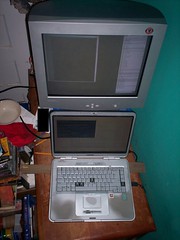
Looking down upon a 19 inch CRT above a fairly-large-but-very-small-seeming laptop. (This time cleverly edited so as not to display my credit card number)
Remember how I added a CRT to my laptop? Well, though I said 19" on that post, it was actually a 17". (I guess. It's smaller than my new monitor, which I'm fairly certain is a 19" and is certianly smaller than my broken 21") However, since I had two unused 19" CRTs sitting around, I just upgraded again. I still can't get to 1600*1200 on the big one, but things are bigger now, which is nice. Probably uses more power, too. Bummer.

Oh, how I wish I could add a third monitor. I have three or four monitors sitting in my closet, two unused downstairs, and one taking up space on the floor of my room.

Anyone want a spare CRT?

UPDATE: It was all blurry--bad dot pitch maybe? I dunno--so I switched to the other 19" CRT and this one can go up to 1792*1344. Wicked! Of course, now I'll have the annoyance of the top monitor being wider (pixel-wise) than the LCD. But I can live with that.

UPDATE MORE: It was all black, so I did run cmd alt+enter alt+enter and it was fixed, but with the scrolling desktop. Apparently it can now only go up to 1600*1200. :-(

Saturday, May 05, 2007

Bank of America. Oh oh oh!

Logging in to their online banking system is a pain. Why? Because I know my SSN (used as the username) and I know my password, but they've decided that's not good enough, no. I enter my SSN and then they ask me 'What's your maternal grandmother's maiden name?' Now, I know the answer to this. You could probably figure it out too. Sadly, Bank of America doesn't have a clue, and I don't recall telling them anything but the truth.

So how do I log in? I try answering a few times, and finally it asks my father's middle name. This one I know. This one I know you can find in a matter of minutes using Google. My father goes by his middle name. And Bank of American knows the correct answer to this one. So finally I manage to get in.

By 'in' I mean I'm to the point where I can enter my password.

By the way, if you ever want to be annoying, all you need to do is get to this point and then enter the wrong password a few times.They'll shut down online access to my account until I dig up some silly information and fill it in. Could be worse. My brother had to call them with his account number and a recent transaction--and he was in Germany at the time, meaning he couldn't unless he wished to spend lots of money.

So long as I'm explaining how Bank of America's security sucks, I should mention SiteKey. SiteKey is an image you choose that they show you after you supply your SSN and the answer to the security question. If you see the SiteKey image that you chose when setting up your account, you know it's really Bank of America and you can safely enter your password.

Either that or it's a phishing site that took your SSN and security question answers soon as you provided them, showed them to the real Bank of America, got your SiteKey image, and then showed it to you, defeating this brillant security measure in a matter of seconds.

Okay, so maybe they'll notice if a single phishing site is sending these requests to BoA for every person they fool, but how many of you think this isn't easy to hide sufficiently well to avoid any automatic detection BoA may have set up? Yet another example of fake security. it makes you feel safe, unless you're competent and actually think it through.

Wednesday, May 02, 2007

I used to tell people to not write down their passwords.

Then I started helping out at a website that only stores hashes of user's passwords, and no password-resetting mechanism. If someone loses their password, I can reset it manually, given proof that they're the actual owner, but I hate doing that, in part because my idea of proof is that you have the password to the account. A site where 0.469980026% of all accounts have the password 'password' and 0.403889085% have the password '1'. A site where there are 34179 passwords among 68088 accounts. Okay, really, these statistics are better than I expected. In fact, I cannot believe I got those queries right. Must be all those people who register and then never log on. They have strong, distinct passwords. The active users don't.

Anyway, they use weak passwords and still they forget their passwords a lot. So now I tell them to write their password down. There are betters ways of doing it. Personally, I want a secure hash I can calculate in my head--and there are some good ideas on how to do something along those lines--but most of these people are youngish kids.

Anyway, this person presented a good argument that struck me. In my pocket, I have 43.19 USD (often over 100USD) and 0.11 Euroes, 47.11 USD on a Barnes and Noble gift card, three credit cards with a total credit line of over 10 000 USD, and keys to my house, van, and truck. Most people probably have much more than that.

If my pocket is secure enough for all that, it's secure enough for my password. Not my GPG passphrase, perhaps, but most passwords aren't worth more than the rest of my wallet. You don't even need to write it down in plaintext. A shift cypher will stop casual thieves. Or a different font (I sometimes take notes in Tolkien's Elvish Tengwar script. I also know most of the Greek alphabet. Studied Russian? Arabic? Mix a couple alphabets together. Use a shorthand of your own. (I have quite a few symbols I made up for taking notes. Surely you have some too?)

If you're really paranoid, encrypt your password with a one-time pad and store the password list somewhere secure and the one-time pad somewhere independently secure. (IE, finding a way to access one will not help me access the other.) Yeah, you still have to memorise your passwords to use them, but the cost of not remembering is now that you only temporarily lose access--just until you go to these two secure areas and combine them--freeing you to use a stronger password than if memorisation was your only recourse. But what I'm mostly concerned with here are the non-security-minded users. Most people don't consider how long it takes the bad guy to guessing their password using a computer. They just think about whether they can remember the password and whether typing it in each time takes too long. Security means keeping unauthorised users out and letting authorised users in. If the security-minded ignore the second half, we miss the priority of the average user, so they ignore our advice.

Thursday, March 29, 2007

Gah.

So, they got a new Dell Inspiring (Windows Vista)1 and a Netgear WNR834B at the office. I'm to downgrade to XP, and set up the new Netgear router.

My expectations:
* Downgrading can be a pain. Vista prevents such things somehow. Like, the XP CD has a forward-compatible check for newer versions of Windows or something. So I brought a Knapp Live CD in order to wipe the hard disk if necessary.
* Installing a router is trivial: you just plug it in, and then do some configuring if you want encryption.

Turns out they forgot to provide an XP CD, so all I have to do today is install the router. I don't mind. I wanted to do that before downgrading to XP, anyway. This way I go home early. (Wrong.)

Anyway, their original setup was:

 Five ethernetted computers
|
Linksys Switch
|
Sprint 645 DSL modem.
I'm not replacing the Linksys switch. Sadly, the Netgear software /really/ wants me to. I hate software that thinks it knows anything. So I just go ahead without their lame software.

Netgear WNR834B has five plugs: four ethernet plugs and one last ethernet plug labelled 'Internet'. I believe what I did initially was:
 Netgear's Internet plug
|
Linksys Switch ---- Sprint 645 DSL modem
|
Five ethernetted computers
Now the laptop can detect and connect to the wifi network, but no Internet. http://192.168.1.1/ works for the web configuration on Netgear. I do this and that and so on. Eventually, with Martin's help, I get Internet access via wifi, I believe mostly thanks to changing LAN IP Setup->LAN TCP/IP Setup>IP Address from 192.168.1.1 (which is also the default gateway used by the Linksys switch) to 192.168.1.2 (which is unused). I also changed from the Internet ethernet port to just an ordinary one.

So! Now the laptop has a very slow, port 80-only wifi connection. But it can no longer connect to the web configuration for Netgear. I tried http://192.168.1.2/ (what it should be), http://192.168.1.1/ (what it used to be), https://192.168.1.2/ (what my home Linksys router uses), https://192.168.1.1/ (combine first and third), http://192.168.0.2/ (I needed for stuff to try), http://192.168.0.1 (I tried everything else already). Nothing works. I can ping 192.168.1.1, but that's set as the Default Gateway, so of course I can. Probably not the Netgear router I've just pinged, but the Linksys switch.

Botheration. So you know what I go ahead and do? Slow Internet access is all very nice, but I want configurability, so I go in there and reset the router. Stick a pin in that little red hole.

Takes the entire network down. Sorry, guys, were you using that? I mess around with the cords and it gets back up pretty quickly.

But this did fix the problem somewhat for a few seconds. I connected to the Netgear web configuration thing over wifi (but could not connect to the Internet over wifi, unless I'm misremembering) and it's all 'Wanna check for firmware updates?' I say 'Sure.' Then my wifi connection drops. (Oh, yeah, it says not to do that over wifi.) Cannot even /find/ the wifi network. The router has power. It has blinkenlights. But Vista can't see any such network. So I reset the stupid thing again. Taking down the network again, this time in part thanks to my bumping a power cord.

Once the network is back up, I try around for the wifi. Vista can't find it. Not even when I hold the laptop right next to the Netgear router. So I plug the laptop into the Netgear ethernet, and I can connect. I can check the status (and be told that the wifi has such and such uptime (not much yet, but climbing about five seconds per five seconds). So why can't I detect this fabulous network? This is not a problem with Vista. There are other networks around. They're secure, faint, and vanish all together by 5pm, but I saw them. They were around for longer than our Netgear's.

I try messing around with cords. Plug the laptop directly into the Linksys switch. Plug the Netgear router into the Linksys Switch and into the laptop. Two problems: 1. it's not helping and 2. doing things like this tends to take down the entire network.

FINAL STATUS: Unresolved.

I'm stumped for now. Your mission is to reply to this with a simple, effective solution. Simple, effective, /cheap/ solution. Next time I go (when the XP CD arrives from the main office), I'll probably go ahead and bring my laptop (a second opinion on wifi detection), and possibly my Linksys router.

There are only five computers in addition to the laptop, so if I have to switch around the Netgear router and the Linksys switch so the router is the one connected to the modem, that could be feasible, but I think my main issue is:
* Linksys and Netgear both want 192.168.1.1 and changing that caused problems.
* Netgear has decided to stop broadcasting.
(Using JUST the Netgear router seems infeasible, since it only has five plugs total, and we have five ethernetted computers. One plug needs to go to the modem.)

1 By the way, the Dell Inspiron:
* Monitor seems kind of meh.
* Battery life looks to be under three hours, as I recall. It wasn't great, anyway.
* Quiet. Very quiet. Dead silent, most of the time. My old Compaq Presario has been known to wake me up at night with its crummy fan (though it was pretty good when new). This Dell, though...if my laptop became this quiet, I'd go into a panic whenever I entered the room because 'OH, NO! It's off! What happened?'
* Close lid=hibernate/suspend. Open lid=nothing. Press power button=nothing. Unplug and remove battery, put battery back in, and then press power button=ah, good. Later discovering holding down the power button for several seconds is the way to unhibernate/unsuspend=engineers are vile abominations who should never have a thing to do with UIs. or maybe the UI designers did this. Anyway, whoever came up with the idea of my having to hold down the power button to turn the computer back ON is the devil.

Wednesday, January 10, 2007

I'm so stupid.

I've had my 19" CRT sitting unused on my floor for months and months. Finally, in a mad fit of brilliance, I finally hooked it up to my laptop. Combined resolution is 1280*1824. Makes up for my laptop being unable to go to 1600*1200.

Optimally, I'd put the CRT on something just behind my laptop so it really was right above my LCD so they were physically in the same location as they are desktopically. As it is, the CRT is physically to the left and desktopically below.

On the plus side, my desk hasn't been so clean for ages. The floor, on the other hand, has acquired a large collection of stuff that belongs on the desk. Or belonged until the CRT took the position of honour.

I have a couple more spare CRTs, but I'm out of ports and I don't know how well a Presario r4000 would support five monitors. Well, maybe I do know, and the outlook is not good.

Oh, and on the plus side, my room will be much warmer with a 19" CRT running in the corner.