Orders of magnitude.
I was riding home when I noticed the speed limit sign said '55 MPH', but the van clock only said 4:33. 'We should accelerate 11.7MPH.
Oh...wait...'
Labels:
math,
my stupid life

I was riding home when I noticed the speed limit sign said '55 MPH', but the van clock only said 4:33. 'We should accelerate 11.7MPH.
Oh...wait...'
Bank of America. Oh oh oh!
Logging in to their online banking system is a pain. Why? Because I know my SSN (used as the username) and I know my password, but they've decided that's not good enough, no. I enter my SSN and then they ask me 'What's your maternal grandmother's maiden name?' Now, I know the answer to this. You could probably figure it out too. Sadly, Bank of America doesn't have a clue, and I don't recall telling them anything but the truth.
So how do I log in? I try answering a few times, and finally it asks my father's middle name. This one I know. This one I know you can find in a matter of minutes using Google. My father goes by his middle name. And Bank of American knows the correct answer to this one. So finally I manage to get in.
By 'in' I mean I'm to the point where I can enter my password.
By the way, if you ever want to be annoying, all you need to do is get to this point and then enter the wrong password a few times.They'll shut down online access to my account until I dig up some silly information and fill it in. Could be worse. My brother had to call them with his account number and a recent transaction--and he was in Germany at the time, meaning he couldn't unless he wished to spend lots of money.
So long as I'm explaining how Bank of America's security sucks, I should mention SiteKey. SiteKey is an image you choose that they show you after you supply your SSN and the answer to the security question. If you see the SiteKey image that you chose when setting up your account, you know it's really Bank of America and you can safely enter your password.
Either that or it's a phishing site that took your SSN and security question answers soon as you provided them, showed them to the real Bank of America, got your SiteKey image, and then showed it to you, defeating this brillant security measure in a matter of seconds.
Okay, so maybe they'll notice if a single phishing site is sending these requests to BoA for every person they fool, but how many of you think this isn't easy to hide sufficiently well to avoid any automatic detection BoA may have set up? Yet another example of fake security. it makes you feel safe, unless you're competent and actually think it through.
I used to tell people to not write down their passwords.
Then I started helping out at a website that only stores hashes of user's passwords, and no password-resetting mechanism. If someone loses their password, I can reset it manually, given proof that they're the actual owner, but I hate doing that, in part because my idea of proof is that you have the password to the account. A site where 0.469980026% of all accounts have the password 'password' and 0.403889085% have the password '1'. A site where there are 34179 passwords among 68088 accounts. Okay, really, these statistics are better than I expected. In fact, I cannot believe I got those queries right. Must be all those people who register and then never log on. They have strong, distinct passwords. The active users don't.
Anyway, they use weak passwords and still they forget their passwords a lot. So now I tell them to write their password down. There are betters ways of doing it. Personally, I want a secure hash I can calculate in my head--and there are some good ideas on how to do something along those lines--but most of these people are youngish kids.
Anyway, this person presented a good argument that struck me. In my pocket, I have 43.19 USD (often over 100USD) and 0.11 Euroes, 47.11 USD on a Barnes and Noble gift card, three credit cards with a total credit line of over 10 000 USD, and keys to my house, van, and truck. Most people probably have much more than that.
If my pocket is secure enough for all that, it's secure enough for my password. Not my GPG passphrase, perhaps, but most passwords aren't worth more than the rest of my wallet. You don't even need to write it down in plaintext. A shift cypher will stop casual thieves. Or a different font (I sometimes take notes in Tolkien's Elvish Tengwar script. I also know most of the Greek alphabet. Studied Russian? Arabic? Mix a couple alphabets together. Use a shorthand of your own. (I have quite a few symbols I made up for taking notes. Surely you have some too?)
If you're really paranoid, encrypt your password with a one-time pad and store the password list somewhere secure and the one-time pad somewhere independently secure. (IE, finding a way to access one will not help me access the other.) Yeah, you still have to memorise your passwords to use them, but the cost of not remembering is now that you only temporarily lose access--just until you go to these two secure areas and combine them--freeing you to use a stronger password than if memorisation was your only recourse. But what I'm mostly concerned with here are the non-security-minded users. Most people don't consider how long it takes the bad guy to guessing their password using a computer. They just think about whether they can remember the password and whether typing it in each time takes too long. Security means keeping unauthorised users out and letting authorised users in. If the security-minded ignore the second half, we miss the priority of the average user, so they ignore our advice.

The ISS is nice, I suppose. But what do they even do up there on it? Do you know? I don't know. It's probably useful stuff. Learning more about long-term space habitation is always good.
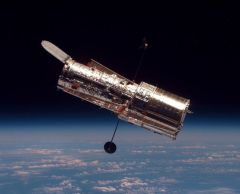
The Hubble Space Telescope (image from NASA)
There's a train that runs behind our house. Well, behind the woods behind the huge lot behind our house. You can hear it when it drives by. Plus, it likes to toot its horn.
Anyway, it always goes by at 1am. Only I've been wondering lately whether it does any more. I tune it out, and I'm usually asleep at that time.
But I hear it now. It's there. And tooty.
I don't mind trains. Trains come by and then are gone. Cars on the highway, however, are intermittent and just don't stop coming.
(Hello, train. I said you come by and then are gone. You can stop tooting now. Jeez.)
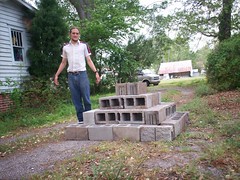
Okay, so I took over a hundred photos at the recent FLT gathering (homeschooling group). Lots of kids. I should be able to post those without anyone getting upset (though I know people who would be upset if I posted photos of them). How about labelling who each person is? With their full name? And address?
Okay, I'm not including the addresses, and usually I only know the first name. Surely /that/ much is fine, right?
These people are mostly sensible. They won't care, I suspect.
Gah.
So, they got a new Dell Inspiring (Windows Vista)1 and a Netgear WNR834B at the office. I'm to downgrade to XP, and set up the new Netgear router.
My expectations:
* Downgrading can be a pain. Vista prevents such things somehow. Like, the XP CD has a forward-compatible check for newer versions of Windows or something. So I brought a Knapp Live CD in order to wipe the hard disk if necessary.
* Installing a router is trivial: you just plug it in, and then do some configuring if you want encryption.
Turns out they forgot to provide an XP CD, so all I have to do today is install the router. I don't mind. I wanted to do that before downgrading to XP, anyway. This way I go home early. (Wrong.)
Anyway, their original setup was:
Five ethernetted computersI'm not replacing the Linksys switch. Sadly, the Netgear software /really/ wants me to. I hate software that thinks it knows anything. So I just go ahead without their lame software.
|
Linksys Switch
|
Sprint 645 DSL modem.
Netgear's Internet plugNow the laptop can detect and connect to the wifi network, but no Internet. http://192.168.1.1/ works for the web configuration on Netgear. I do this and that and so on. Eventually, with Martin's help, I get Internet access via wifi, I believe mostly thanks to changing LAN IP Setup->LAN TCP/IP Setup>IP Address from 192.168.1.1 (which is also the default gateway used by the Linksys switch) to 192.168.1.2 (which is unused). I also changed from the Internet ethernet port to just an ordinary one.
|
Linksys Switch ---- Sprint 645 DSL modem
|
Five ethernetted computers
